I Self-Hosted AI for a Week. The Model Was the Easy Part.
I asked a local model a question on my MacBook and went to make coffee. Two minutes later it was still typing. So I rented one GPU in the cloud, loaded several open model families onto it, and spent a week doing what I thought was model testing. It was not. What the week actually taught me is that the thing we casually call "the model" is an entire engineered system, and the model is the easy part. This is that story, told so a reader with no AI background can follow every step, and it ends where my day job lives: what running raw, less-constrained models taught me about designing guardrails for AI agents.
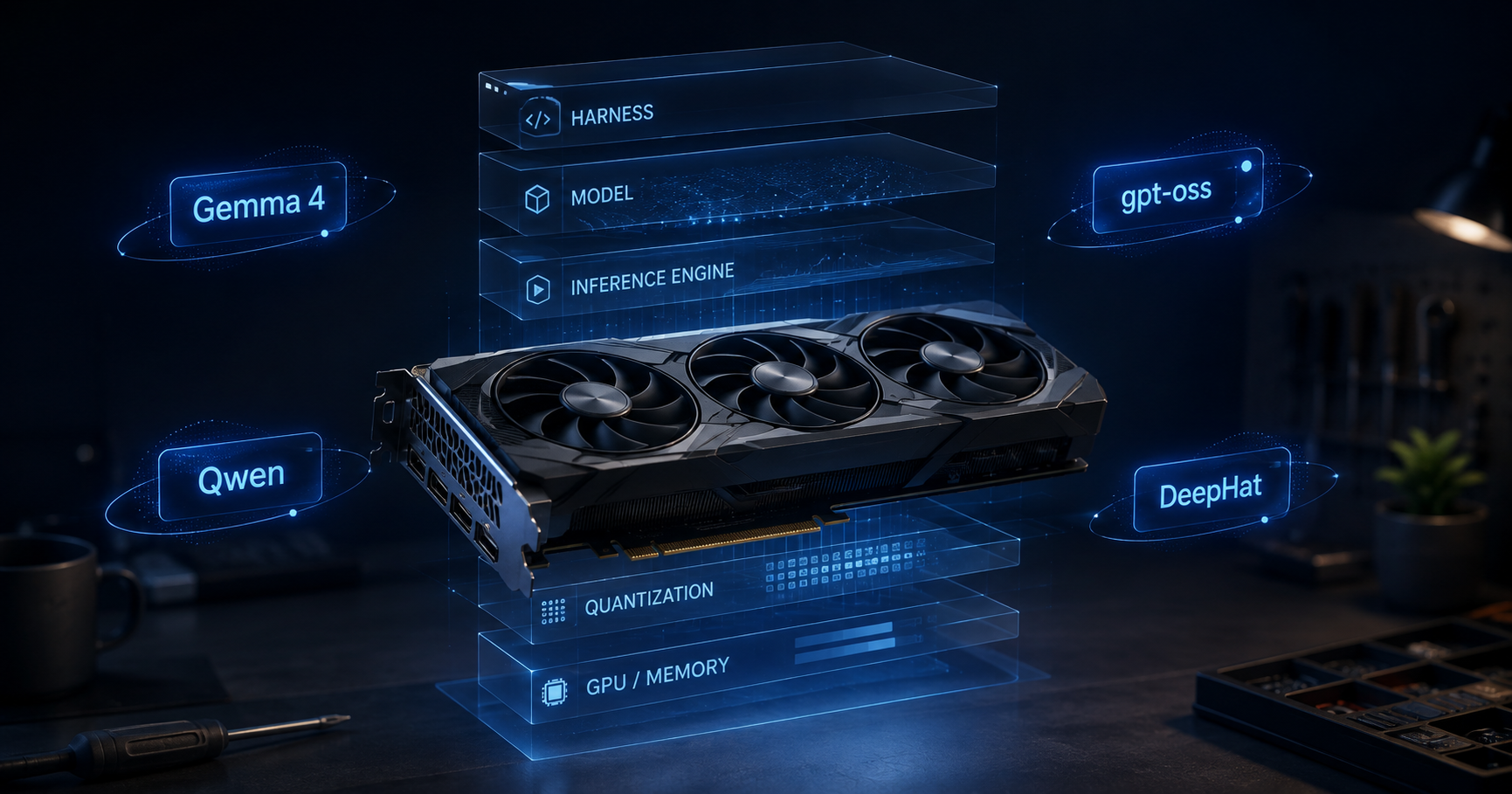
I thought I was testing models
The plan was simple. My MacBook was too slow for serious local models, so I rented a g2-standard-8 machine on Google Cloud: 8 virtual CPUs, 32 GB of ordinary RAM, and one NVIDIA L4 GPU with 24 GB of its own memory, called VRAM. Keep those two memories separate in your head: the RAM is the storeroom where you stage deliveries; the VRAM is the workshop itself, where the model actually works. For fast GPU-only inference, you want the model and its working context to fit inside the workshop, and 24 GB is the realistic mid-range rental.
The models came fast: Gemma 4, OpenAI's gpt-oss, several Qwen builds including an abliterated coder, and a security specialist called DeepHat. The same questions that took a two-minute coffee break per answer on my MacBook came back in seconds on the L4. Day one felt like victory. The rest of the week dismantled my mental model of what I was even renting the GPU for.
24 GB changes how you think
On an API you never think about memory. On your own GPU, four terms stop being trivia and become daily decisions. Picture what you are doing as renting a fully equipped workshop by the hour, instead of buying machines you will use for one project. That rental is the whole cloud GPU decision, and the four terms are just facts about the workshop.
Parameters are the tools on the wall. A "12B model" is a workshop hung with twelve billion tools. More tools handle more jobs, but every tool needs wall space, and that space is VRAM. The working rule: every billion tools needs about 2 GB at full size (FP16), about 1 GB at 8-bit, about 0.5 GB at 4-bit [8].
Quantization is the compact travel version of each tool. Same job, slightly less finesse, a quarter of the space. One honesty note: 4-bit is not one thing; GGUF Q4, AWQ, GPTQ and MXFP4 are different schemes with different quality costs, which is why gpt-oss ships its own MXFP4 rather than a generic quant.
The context window is the blueprint on the bench. The longer the drawing the model keeps unrolled, the more bench it covers, space stolen from the tools. Technically that bench space is the KV cache: a few thousand words cost 1 to 2 GB, book-length can pass 8 GB [8]. A card advertising a 262,000-token window will load on a 24 GB GPU, but you will not unroll a blueprint that size next to the tools. Specs are ceilings, not promises.
Tokens per second is finished pieces per hour. Published figures for 7 to 9B-tool workshops at 4-bit on 24 GB-class cards cluster around 40+ tokens per second [9]. I did not log throughput rigorously and will not invent numbers; what I observed is the coffee-break-to-seconds gap above, on every model I ran.
32B is where quantization stopped being vocabulary
Up to about 12B parameters, the workshop feels roomy and the rules above are trivia. Then I pushed toward a 32B-class model, and quantization became capacity planning instead of vocabulary.
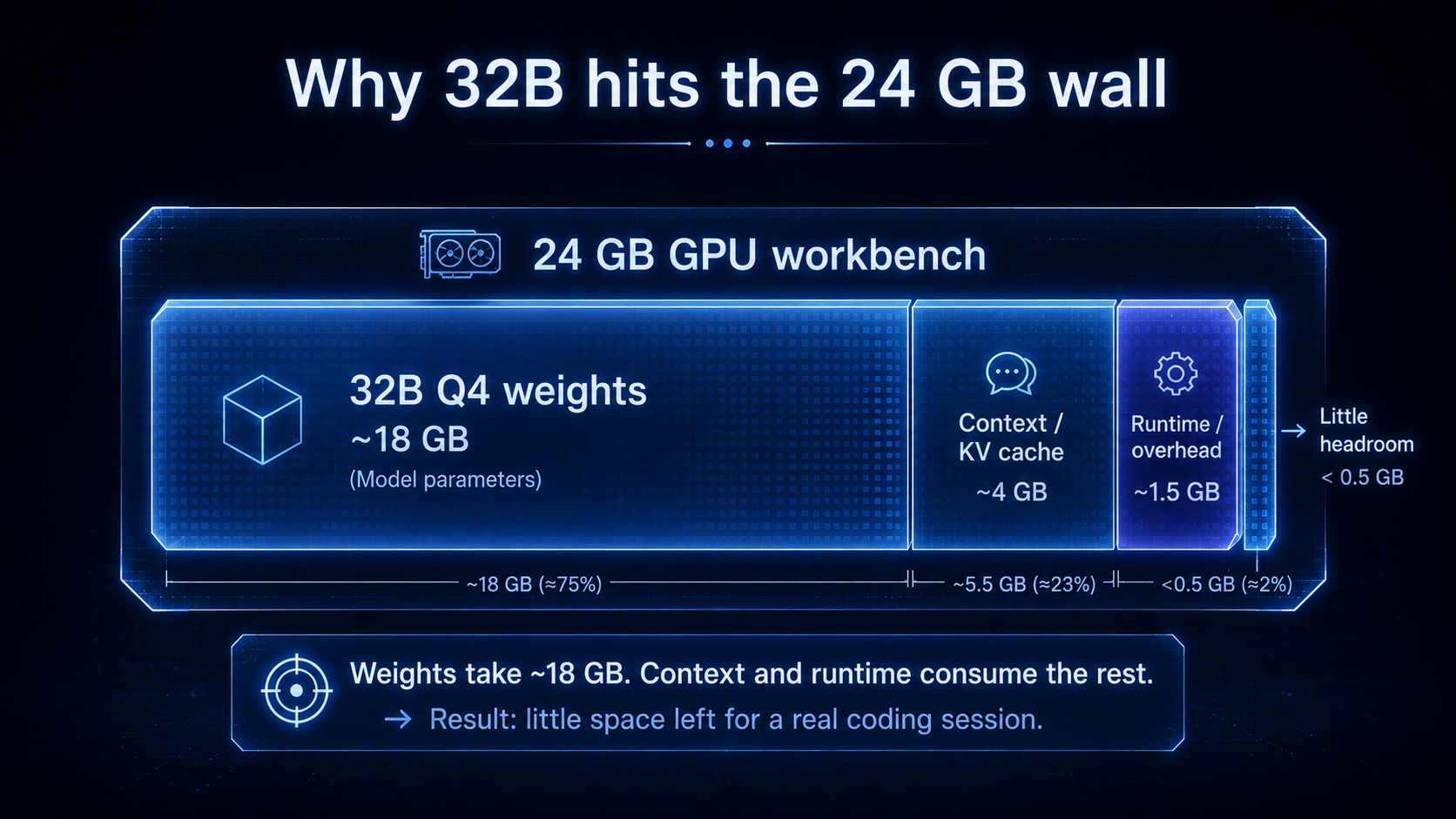
The model I wanted was qwen2.5-coder:32b, the 32B coder I hoped to drive a real coding session with. The arithmetic ruled it out before I burned a session on it: thirty-two billion parameters at 4-bit is roughly 18 GB of weights, and once I wanted a working context and the runtime took its share of 24 GB, there was no bench left for the blueprint. The fallback would have been partial CPU offloading, at the cost of much slower generation; rather than spend the evening on that, I did what the numbers told me and dropped to a 14B coder. That trade, giving up parameters to buy back context and headroom, is the whole lesson of this section: on one 24 GB GPU, model size is not a preference, it is a budget.
The arithmetic explains the wall. Thirty-two billion tools at 4-bit is roughly 18 GB of weights before the blueprint and the runtime take their share of a 24 GB workshop; leave less than 2 to 4 GB of margin and you are quickly into OOMs, reduced context, or CPU offloading, depending on the runtime. This is the moment capacity planning stops being vocabulary.
The model was only half the product
Here is the discovery that reorganized this whole article. Chatting with a local model works on day one. Then I pointed opencode, an open-source coding harness, at my own endpoint instead of a paid API, and tried to work the way I work with Claude Code. The difference was immediate, and it was not the model's intelligence. It was everything wrapped around the model that a polished product never shows you: the system prompt, context allocation, tool descriptions, tool-call syntax, parsing, retries, the planning loop, state across turns.
The first wall was not intelligence, it was refusal. Plain qwen2.5-coder declined offensive-security tasks outright, which for the security work I was testing was a dealbreaker, so I switched to an abliterated build (huihui_ai/qwen2.5-coder-abliterate:14b) where much of that refusal behavior had been removed. Lesson one, before any tool call: refusal behavior is part of model behavior, not a security boundary, which is exactly why a modified version of the same base model can give a different answer.
The second wall was behavior. Pointed through a harness at real files, the small model flailed on multi-step tasks, wandered off format, and produced structured, JSON-shaped fragments where I wanted plain edits. My fix was not a better prompt to the model; it was an output contract in the harness profile, a block of custom instructions constraining how it was allowed to respond. Note the word I am not using: that is a behavioral constraint, not a guardrail. A guardrail, later in this article, means an enforceable control, authorization, policy, validation, a kill switch. Conflating the two is an easy architectural mistake. What the fix taught me is that what looks like "the model misbehaving" is usually the model plus its chat template plus the runtime plus the harness, and for this kind of interface failure the durable fix belonged in the harness layer I controlled, not in changing the weights.
That JSON incident taught the deepest lesson of the week: what looks like model behavior is often model plus chat template plus runtime plus harness behavior. Four layers can each bend the output, and from the outside you cannot tell which one did. The stack you are actually operating looks like this:
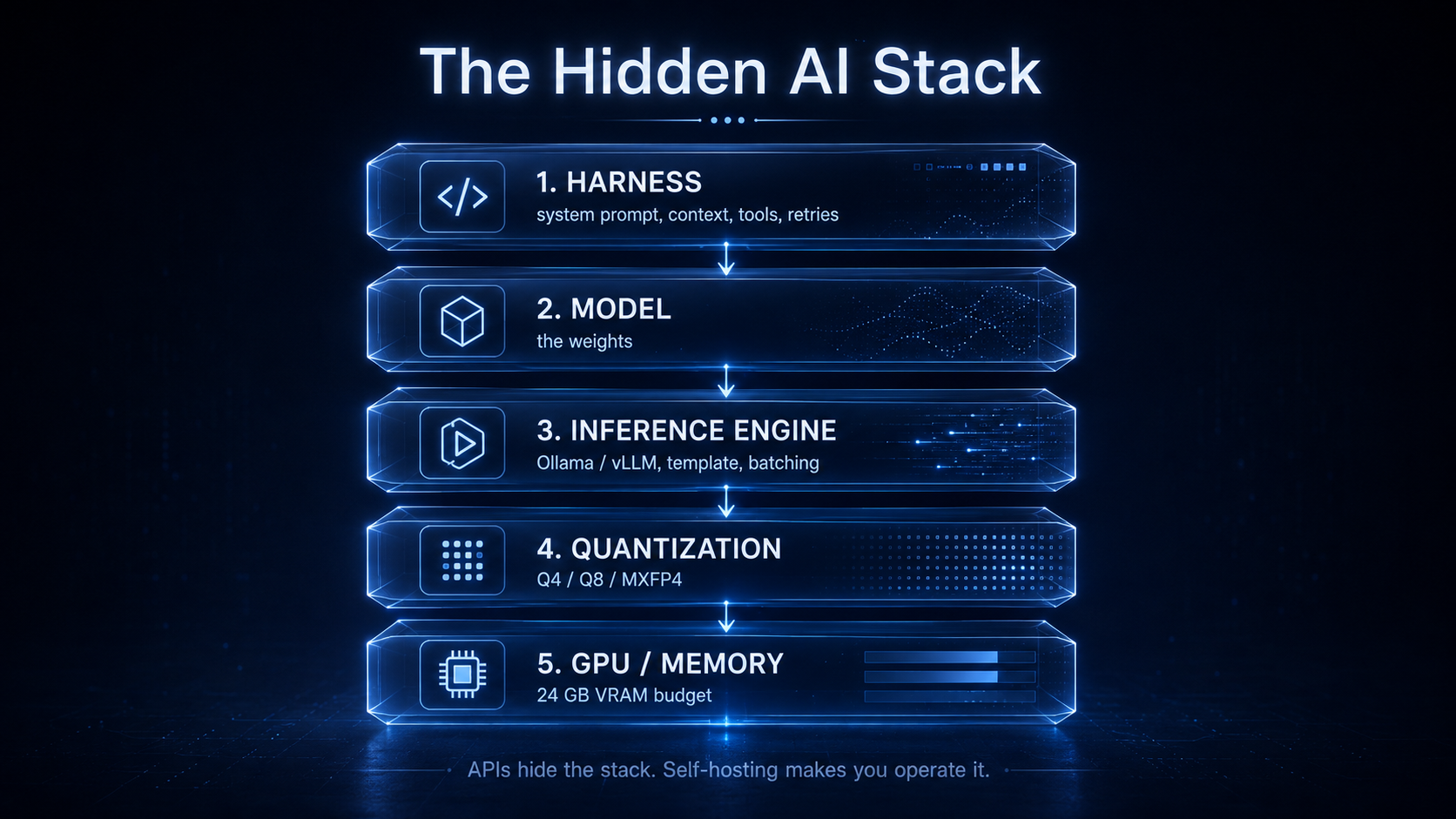
When people say "the model did X," any layer of that stack may be the real author. APIs hide the stack. Self-hosting makes you operate it, and that is the education.
Capability was not the biggest difference. Friction was.
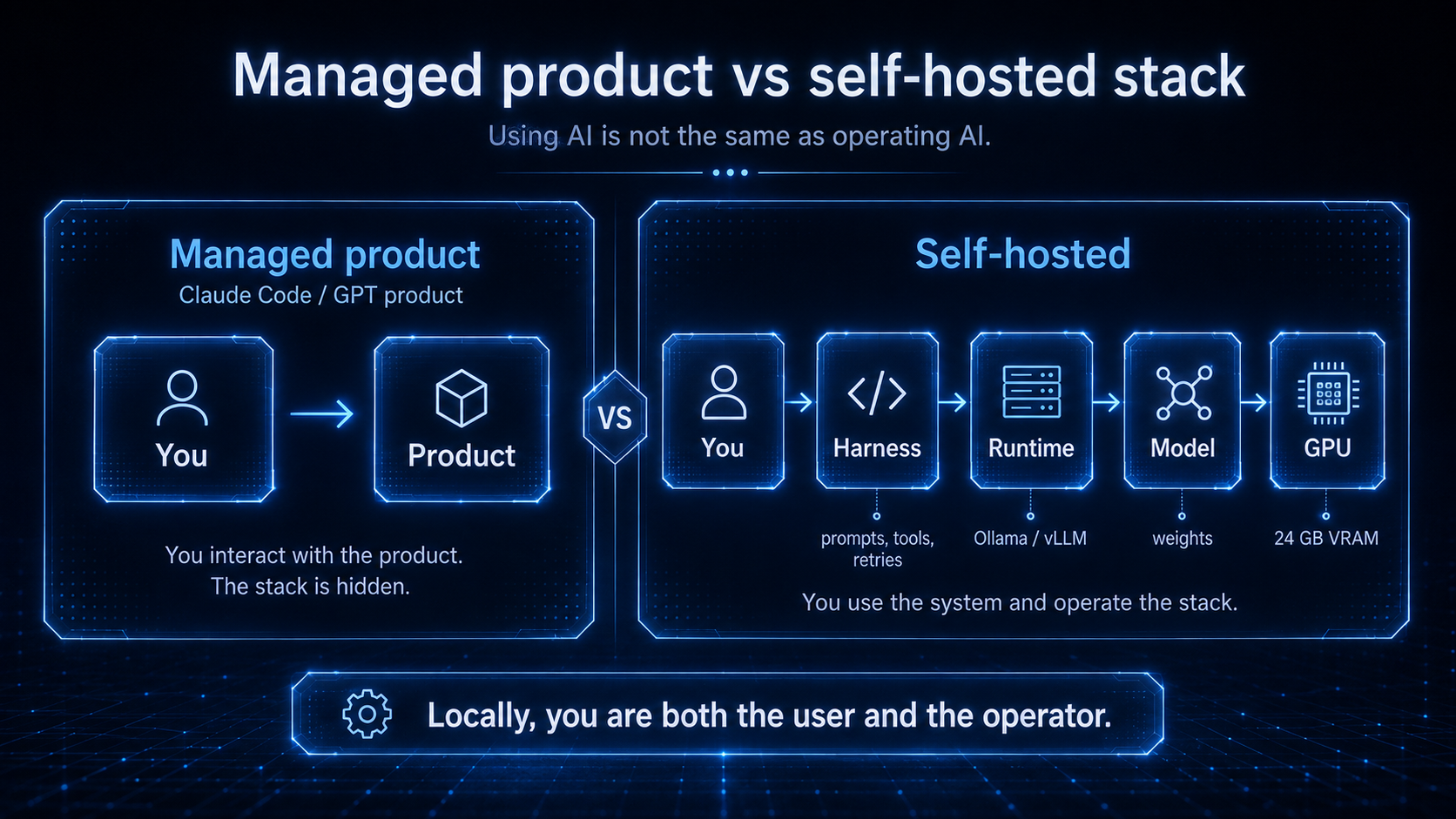
The honest comparison with frontier products is not a benchmark score. With Claude or GPT, I could usually describe an intention, even sloppily phrased, and the system worked out what I meant. With several local setups, I found myself describing the interface contract instead: exactly how to behave, exactly what format to answer in, exactly which tool to call.
The clearest example was the coding work above. With Claude Code I interacted with a product: I handed over a loosely phrased goal, and something else had already decided the model, the context budget, the tool wiring and the retries. Locally I was operating the product and using it at the same time, assembling model plus runtime plus harness myself before the same intention survived the round trip. That is not Claude versus Qwen; it is a managed, vertically integrated product versus a stack you wire together. For the tasks I tried, raw model capability was not what surprised me. Integration friction was, and the friction is the product.
What each model taught me
| What I ran | Why I tried it | What happened |
|---|---|---|
| Gemma 4 12B | general daily driver, images | fit an L4 comfortably at 4-bit; my default |
| gpt-oss-20b | reasoning and tool use | MoE, ships MXFP4; felt unusually capable for how comfortably it ran on the L4 |
| Qwen3.5-9B | small all-rounder | my favorite small all-rounder in this experiment |
| qwen2.5-coder:32b | wanted to test a larger coding model | did not fit a working context on 24 GB; dropped to 14B |
| qwen2.5-coder-abliterate:14b | the standard build refused the security tasks I tried | the tested refusals no longer appeared; needed a harness output contract to stay on format |
| DeepHat-V1-7B | security / guardrail lab (in LM Studio) | the failure-surface map for the guardrail section |
This is the experiment, not a spec sheet. Parameter counts and context ceilings are on each model card [1][2][3][4]; I did not benchmark tokens per second and will not invent numbers.
Gemma 4 12B (Google) is multimodal with a 256K context [2], fits an L4 comfortably at 4-bit, and became my daily driver for general work and anything involving images.
gpt-oss-20b (OpenAI) is 21B parameters with only 3.6B active per token, shipped already quantized to MXFP4 so it runs within 16 GB [1]. This is mixture-of-experts working exactly as our MoE explainer promised: all twenty-one billion tools hang on the wall and bill for the space, but only the few billion relevant to the job get picked up, which means less computation per token than a dense model of the same size, so it can feel fast; that is not why it is small.
Qwen3.5-9B (Alibaba) packs a 262K native window into 9B parameters [3], my favorite small all-rounder in this experiment, with the blueprint caveat from above.
Abliterated and uncensored builds were the ones that taught me the most, not because I wanted their output but because I needed to see it. Running huihui_ai/qwen2.5-coder-abliterate:14b next to its governed sibling is what turned "guardrails matter" from a slogan into a checklist.
DeepHat-V1-7B is the specialist: a cybersecurity fine-tune of Qwen2.5-Coder-7B, built for offensive and defensive security work, 131K context [4]. I ran it for exactly the purpose the next section describes.
Ollama optimizes convenience. vLLM optimizes serving.
Ollama is one install and one command per model, quantized variants managed for you; it is built around developer convenience, and for learning it is hard to beat. vLLM is designed around serving efficiency: PagedAttention manages the blueprint memory in pages instead of one contiguous slab, continuous batching keeps the GPU full across many requests, and prefix caching plus structured-output support are why it behaves differently under load, not just faster [11]. The benchmark I cite shows the expected tradeoff: vLLM ahead on time-to-first-token and multi-user throughput, Ollama favouring single-user simplicity [11]. Others exist for later, SGLang and TGI are the names you will meet when concurrency gets serious. I ran both on the L4 and the split held: Ollama for daily driving, vLLM when I wanted several requests served at once rather than one at a time.
Raw behavior changed how I think about guardrails
I run AI agents in production, and everything I publish comes back to one thesis: autonomy must be earned, governed, and revocable. Governance tested only against a heavily mediated API model may never meet some failure modes that your surrounding architecture should still be prepared to contain; the failure surface is wider than that model will ever show you. So I ran adversarial evaluation against less-constrained variants, the abliterated coder above and DeepHat included, and treated their output as a map of the failure surface my guardrails have to control. This is the discipline OWASP's agentic-security work prescribes, adversarial testing plus continuous defensive validation, done by people who ship governed systems. To be explicit: diagnostic work, not a recommendation to put unguarded models near users.
Three lessons. First, model refusal is only one layer of a safety system, and it must never be the layer your architecture depends on; open weights can be post-trained or wrapped very differently from what any API shows you. Second, critical guardrails must exist outside the model, because controls that live only inside the model disappear when the model changes. The open ecosystem ships the parts: Llama Guard, NVIDIA NeMo Guardrails, and OpenAI's gpt-oss-safeguard classifier [5]; projects like Forge [7] report large gains from wrapping small models in strict tool-calling guardrails, self-measured, so I cite the direction and not the digits. Third, the control plane runs BESIDE the stack diagram above, not inside it: identity, authorization, input policy, tool policy, output validation, observability, and a kill switch.
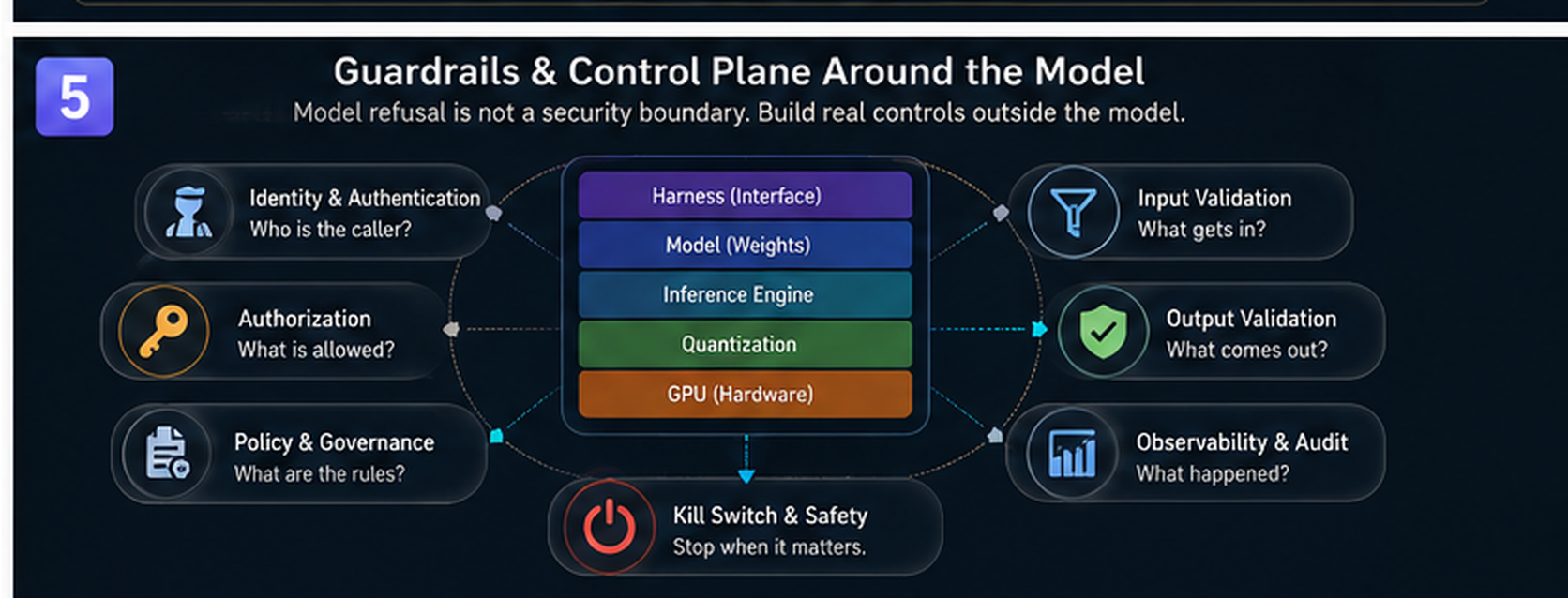
That architecture is its own article, our Agent NOC piece, and this week of raw-model reading was calibrating it. Discipline around a small, governed model beats hope around a big unconstrained one.
The economics, without the romance
Budget for the whole machine, not the GPU line item. The L4 GPU component alone bills $0.56 per hour on-demand and $0.34 per hour spot in us-central1, read from Google's billing catalog on August 17, 2026 [6]; with the g2-standard-8's vCPU, RAM and a boot disk, plan for roughly $0.85 to $0.90 per hour on-demand all-in, about half that on spot. Planning estimates, not catalog quotes: check the live page. For Gulf readers, the same catalog read puts a Dammam spot L4 near $0.54 per hour and a Doha three-year commitment near $0.31 [6].
My week of evenings plus a long weekend on spot came to under twenty dollars all in. The real equation is cost per useful token: infrastructure cost divided by the tokens you actually push through it. An always-on GPU at ten percent utilization is expensive nostalgia; for most bursty, low-volume workloads, APIs are hard to beat. Self-hosting earns its keep with sustained utilization, data that cannot leave, and the raw-model control above, which mainstream managed APIs generally do not expose in the same way.
A back-of-the-envelope VRAM check
For real planning, use the full community calculators first: the VRAM calculator on Hugging Face and the open-source llm-calc [10] model the details this page cannot. The version below is a teaching toy that implements only the rules of thumb above, so you can sanity-check while you read. Trust its verdicts to one significant figure, never to the decimal.
Estimates only: real usage varies by architecture, KV-cache precision and serving stack. For exact numbers per model and quant, use the full calculators [10].
Build your own version of the lab
Create the machine (spot, and accept that Google may reclaim it):
gcloud compute instances create llm-lab \
 --zone=us-central1-a --machine-type=g2-standard-8 \
 --provisioning-model=SPOT --instance-termination-action=STOP \
 --image-family=debian-12 --image-project=debian-cloud \
 --boot-disk-size=100GB --maintenance-policy=TERMINATE
SSH in and install the NVIDIA driver with Google's own installer:
curl -O https://raw.githubusercontent.com/GoogleCloudPlatform/compute-gpu-installation/main/linux/install_gpu_driver.py
sudo python3 install_gpu_driver.py
If nvidia-smi shows nothing after the installer finishes, reboot once before debugging anything else. Then Ollama, and a model that fits with room to spare:
curl -fsSL https://ollama.com/install.sh | sh
ollama pull gemma4:12b   # or: ollama pull qwen3.5:9b
ollama run gemma4:12b
Do not open firewall ports; tunnel instead: gcloud compute ssh llm-lab --zone=us-central1-a -- -L 11434:localhost:11434, then point opencode or your browser at localhost:11434. When spot is reclaimed, the flag above stops the machine instead of deleting it; instances start boots it again from the same persistent disk, with your downloaded models and files intact. And the command that protects your wallet:
gcloud compute instances stop llm-lab --zone=us-central1-aStopping ends compute billing; retained disks and static resources keep billing until deleted, so when the lab is finished, delete the instance AND its disk and any reserved IP.
Questions this article answers
What is the cheapest way to try self-hosting? A spot cloud GPU. The L4's GPU component is about $0.34 per hour spot in us-central1 [6]; an evening of experiments can cost only a few dollars.
What does quantization actually do? Stores weights in fewer bits: roughly 2 GB per billion parameters at FP16, 1 GB at 8-bit, 0.5 GB at 4-bit [8], and 4-bit itself comes in non-interchangeable schemes.
Why did my local model disappoint next to Claude or GPT? Often it is not only the weights. The harness, chat template, runtime and post-training shape the experience alongside the model, and a managed product decides many of those for you; self-hosting makes you operate all of them.
Ollama or vLLM? Ollama optimizes developer convenience; vLLM optimizes serving efficiency and concurrency [11].
Why test less-constrained open models? Adversarial evaluation: mapping the failure surface your external guardrails must control, then keeping those guardrails outside the model where they survive a model swap.
References
- OpenAI: gpt-oss-20b model card - 21B parameters, 3.6B active, MXFP4, runs within 16 GB.
- Google: Gemma 4 12B model card - sizes E2B to 31B, 128K/256K context, multimodal.
- Alibaba: Qwen3.5-9B model card - 9B parameters, 262,144-token native context.
- DeepHat: DeepHat-V1-7B model card - cybersecurity fine-tune of Qwen2.5-Coder-7B, 131K context.
- OpenAI: gpt-oss-safeguard-20b - open safety-classifier variant of gpt-oss.
- Google Cloud: GPU pricing - L4 figures read from the live Cloud Billing catalog, 2026-08-17 (us-central1 on-demand $0.56/h, spot $0.3359/h; me-central2 spot $0.5376/h; me-central1 3-yr commitment $0.3062/h).
- Forge: repository and eval results - guardrail layer for tool-calling; numbers are the project's own 26-scenario suite.
- SitePoint: Run Local LLMs in 2026; DataNorth: Self-hosted LLMs guide - memory-per-parameter and KV-cache rules of thumb.
- LocalLLM.in: Ollama VRAM requirements; MarkTechPost: Best local LLMs on a single 24 GB GPU - throughput ballparks for 24 GB-class cards.
- Community calculators: LLM VRAM Calculator (Hugging Face Space); llm-calc.
- Allen Kuo: Gemma 4 on vLLM vs Ollama benchmarks - TTFT/concurrency vs single-user decode split.